
Step-by-step guide
There is the opportuinty to remove and add the website on your own via backoffice panel. Please note, the number of the webistes allowed is limited on your individual contract. If you have more than 1 domain, to add a domain you will need to contact our support.
If you are using only one, you can remove it and add new on your own. Below you can find few simple steps how to do it.
Step 1. Log in.
Please log into our backoffice with the details provided in the welcoming message
Step 2. Go to the “StatsWidgets” dashboard.
After login, you can see the welcoming screen. In this point, please go to the “StatsWidgets” tab on the top right corner on the screen.
Step 3. Websites
This is Stats Widgets cotrol panel. Here you can find all available options. On the left side menu, choose “Websites” tab.
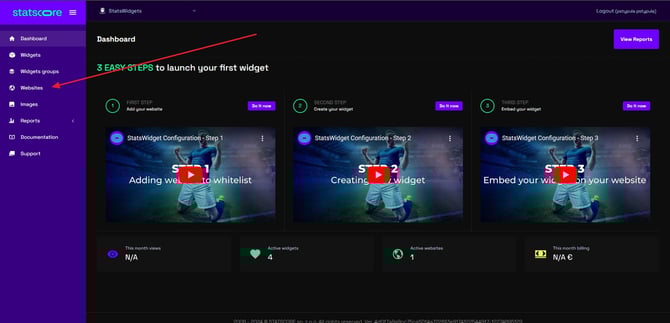
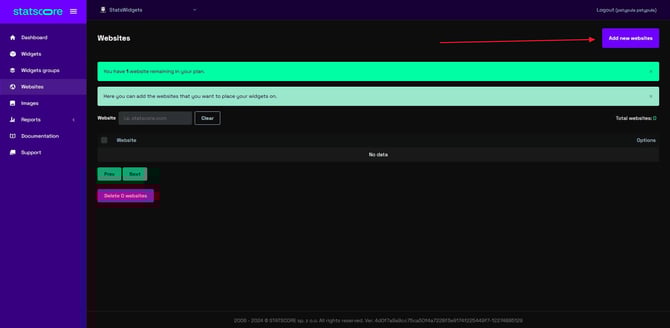
Step 4. Adding the domain
To add a domain please use the button on the right side.
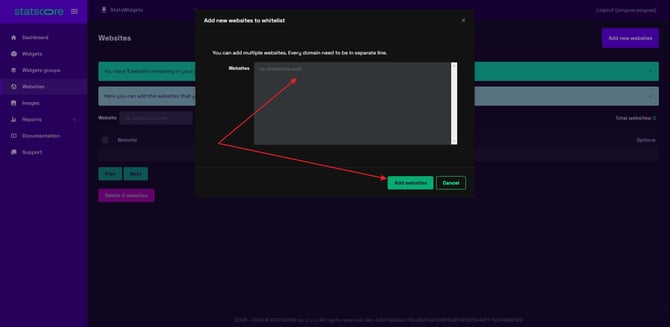
Step 5. Type in the domain address
There is a popup where you can type in the domain address. Please skip www or http, https to avoid issues.
When it is ready, confirm with green “Add websites” button.
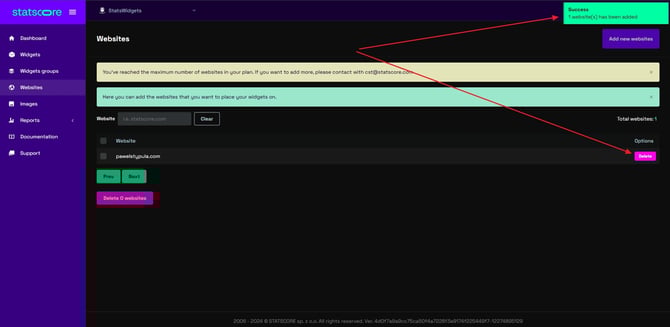
Step 6. Ta-da! This is it!
Congratulations! It is done now, you’ve added your domain to the whitelist and trackers should work now.
From this point you can eventually delete domain by clicking on “delete” button.
This is it. Please remember If you have more than one domain, to add a domain you will need to contact our support: